Collaboration Tools – Microsoft Loop on Teams

Stay in sync with Microsoft Loop on Teams

Microsoft Loop on Teams

Simplified planning with a real-time workspace

Have you tried Microsoft Loop on Teams yet? Great for collaboration, Microsoft Loop is a real-time workspace that assists with planning, brainstorming and of course – collaborating. It features shared content that stays up to date across the Microsoft ecosystem. Microsoft Loop can be accessed on the app or via Teams, Outlook, OneNote and Whiteboard. You can even update the content in Outlook and it will sync!

Microsoft collaboration tools for optimised planning

With Teams notifications and Outlook reminders, Microsoft Loop ensures that your colleagues never miss a beat. From project management to finance – Microsoft Loop is the workspace that keeps everyone on the same page.

Featuring multiple component types for optimised planning and reviewing, Microsoft Loop offers Task lists, Checklists, Tables, Bulleted & Numbered lists, Q&A sessions, Progress trackers, Kanban boards and Team Retrospective features, as well as code for development departments.
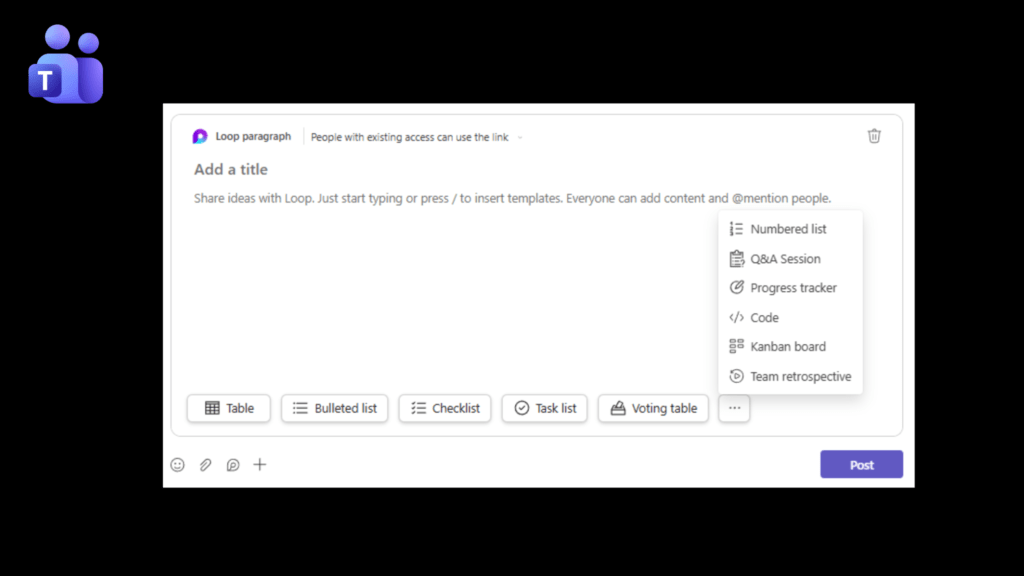
Automatic saving and version control features

Supporting version history, each Loop component is automatically saved as a .loop file in OneDrive. Content can be created in Teams and then opened in the app to expand into a larger workspace or simply kept in Microsoft Teams for your review.

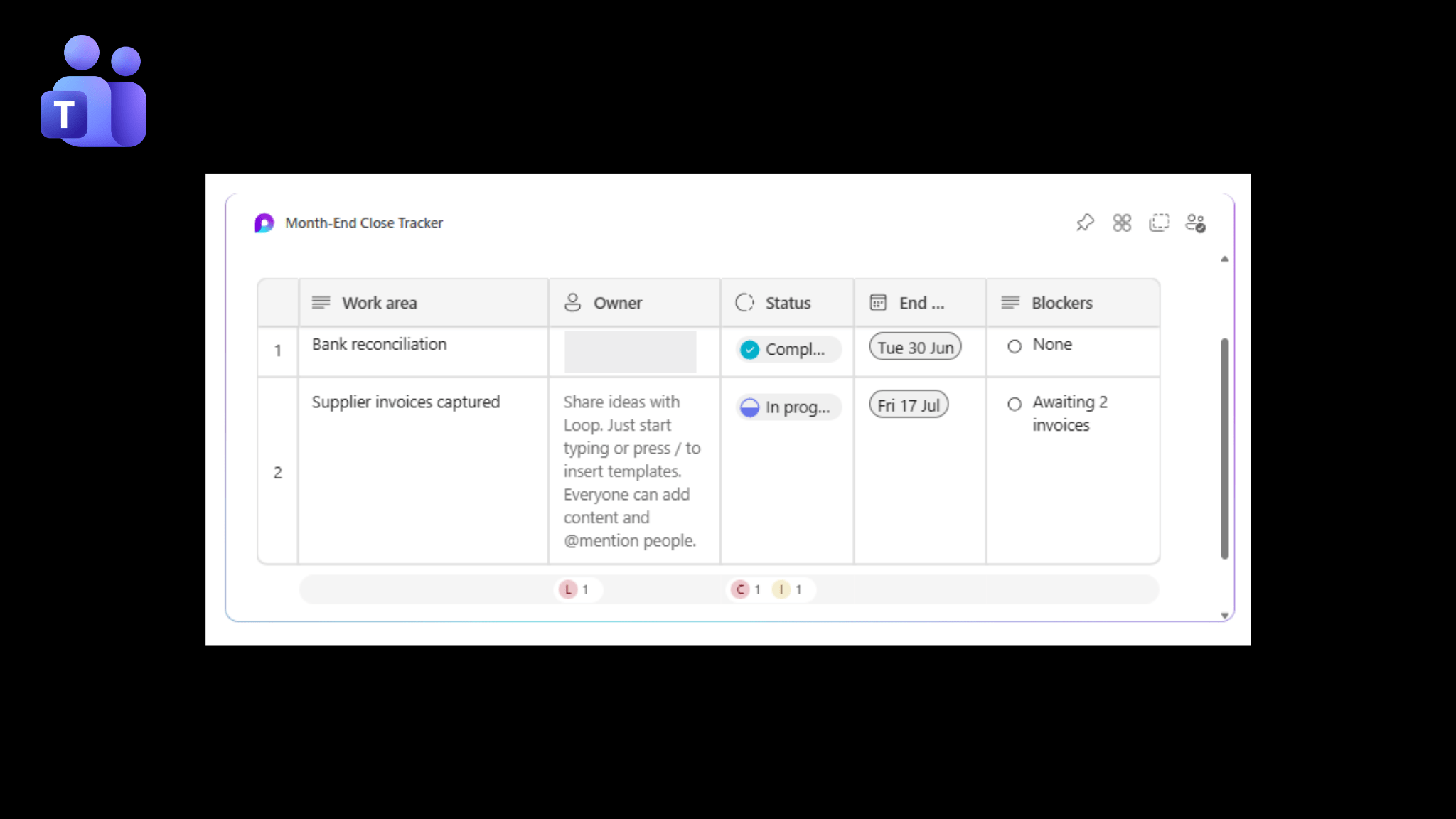
Fun and interactive, Microsoft Loop makes planning a breeze. Allocate tasks to colleagues, set due dates, monitor blockers and keep track of progress, all without leaving Microsoft Teams.
Book Microsoft Teams training today to improve communication, collaboration and productivity.

Click Here to book Microsoft Teams Training.

Start collaborating with Microsoft Loop

Ready to take collaboration to the next level?

At Data4Every1, we help businesses get more from Microsoft 365 with hands-on support and practical training. From setting up your environment to helping your teams confidently use Microsoft tools through our Training4Every1 Microsoft Business Training courses, we turn collaboration platforms into solutions that deliver real business value.

Contact Us and discover how Microsoft Loop can help your team stay connected, organised and always up to date or follow Training4Every1 on Facebook and LinkedIn and never miss a Tip for you or your team.

Want us to feature a tip of your choice?

Drop us a mail sales@data4every1.com.

Browse Blog Categories

Explore our blog categories for practical insights, technology updates and solutions designed to support growing businesses. From automation and business systems to Microsoft tips and training, discover resources to help you keep moving forward.

Business Reporting Solutions, Financial System Solutions, ERP Implementation, CRM Solutions, Microsoft Dynamics 365, Sage Solutions, Business Central, System Integrations, Business Intelligence, Power BI, Cloud Migration, Process Optimisation, Workflow Automation, Data Management, Microsoft 365 Solutions, Azure Solutions, Payroll Solutions, IT Infrastructure.

Business Solutions

Are your systems playing nicely or are you spending increasingly more time trying to connect them and get a single source of truth?

We don't tolerate BS from systems  - our solutions are built to simplify operations, not complicate them. From ERP and CRM to reporting, payroll and cloud solutions, Data4Every1 ensures that all of your data is secure, in sync and integrated - so that your business can scale with confidence. Stop compromising with your software and read more about our business solutions.

read more..

Microsoft 365 Training, AI & Copilot Training, Business Applications Training, End-User Training, Microsoft Office Training, Dynamics 365 Training, Business Central Training, Power Platform Training, Data Analytics Training, Productivity Training, Collaboration Training, Cybersecurity Awareness Training, Certification Pathways, Instructor-Led Training, Virtual Training, Onsite Training, Custom Training Programmes, Corporate Training, Skills Development, Digital Workplace Training.

Business Automation

Is your business automation cutting through the BS? It's time to give yourself a break – be lazy! You deserve it.

Allow business automation to handle repetitive tasks and do away with raising your eyebrow while contemplating the truth. With workflow automation that manages processes and improves visibility - our solutions allow you to take time back and maybe even relax a little! Read more about our business automation solutions and start giving yourself time to grow - along with your business.

read more..

Microsoft 365 Training, AI & Copilot Training, Business Applications Training, End-User Training, Microsoft Office Training, Dynamics 365 Training, Business Central Training, Power Platform Training, Data Analytics Training, Productivity Training, Collaboration Training, Cybersecurity Awareness Training, Certification Pathways, Instructor-Led Training, Virtual Training, Onsite Training, Custom Training Programmes, Corporate Training, Skills Development, Digital Workplace Training.

Business Training

You've invested in tech - systems that will boost productivity and streamline operations, but what about your people?
Do they know how to use the software effectively? Is it making their day-to-day tasks easier, or are they getting frustrated?

Ensure that your expanding enterprise stays ahead and thrives in a competitive landscape by upskilling your teams - Read more about our Microsoft Training solutions and Tips for Teams to foster collaboration between colleagues and systems - because squabbling with tech is never a good look.

read more..

5 Ways SharePoint and CoPilot’s new features are going to help you with day to day work tasks

What's New in Microsoft SharePoint with Copilot. From organising files and folders to finding information and creating content, Copilot on SharePoint makes it easier to organise files and folders, find information and create content directly in SharePoint. 1. Use Copilot on SharePoint to organise your documents into folders that make sense. Yes —...

Microsoft Excel Training

Microsoft Excel Learning Path From formulas to forecasting A 3-part learning journey that equips attendees with the skills to effectively utilise Microsoft Excel in their day-to-day operational tasks. Microsoft Excel Training Part 1 Starting with Microsoft Excel training, Part 1 is the essential first step in your analytical journey. Learn how to...

Your 2026 Microsoft Support Checklist Starts Here

Microsoft Products Ending Support or Retiring in 2026 Microsoft is not slowing down. In 2026, many products will retire, reach end-of-servicing or move to extended support. Ignoring this could leave your business exposed to security risks, compliance issues and lost functionality. At Data4Every1, we help businesses plan upgrades, migrations and...

Power BI Training

https://youtu.be/zlwY3ELs3xE?si=wgwc6TKlwTX8css0 Stop Guessing Your Data. Learn the System Behind It. Your Data Holds the Answers – We Help You Unlock Them Turn Dashboard Chaos into Clarity Reporting is a sore point for many companies with hours being wasted on dashboards that don't match - manually cleaning up data and figures where no one can...

The Stats Behind Copilot’s Impact

Everyone appreciates a good statistic. They offer clear insight into what is working and where real value lies. When it comes to Microsoft 365 Copilot, the data speaks for itself. The results show measurable time savings, improved productivity and a more efficient, streamlined way of working. Let’s take a closer look at how Copilot is...

5 reasons to upskill today (before your competitors do)

Let’s be honest. The world of work is not slowing down. Tech is evolving, regulations are changing and customers expect more. The only real safety net? Skills. Real, relevant, current skills. Here are 5 reasons why now is the best time to invest in your people (and yourself). 1. Change is not coming. It’s already here. From automation to AI to...

Why Microsoft 365 Business Premium Is the Best Security Investment for SMB’s.

In today’s digital business landscape, productivity and security are inextricably linked. While your team needs fast, easy access to tools and data, cyber threats are more sophisticated than ever. Small and medium-sized businesses are no longer overlooked by attackers – they are prime targets. Microsoft 365 Business Premium offers a complete...

Top 5 Reasons Why You Need Microsoft Outlook Training Today

Delving into the benefits of Outlook Training Microsoft Outlook isn’t just an email app, it’s a full-on productivity powerhouse. Yet most people barely scratch the surface. Want to crush deadlines, own your time and make communication effortless? Microsoft Outlook training is your ticket to inbox sanity and time mastery. Here are the top five...

Bitdefender – Trusted Cybersecurity That Works

Comprehensive Security Backed by Global Recognition Your business runs on data—emails, documents, chats and critical systems. The last thing you want is malware, ransomware, or hackers taking that away. That’s where Bitdefender, an award-winning cybersecurity solution of 2025 comes in - simple, reliable and automated, it keeps your devices and...

Microsoft Backup: Keep Your Data Safe Without the Headaches

When Things Go Wrong, Microsoft Backup Steps In Every business runs on data. Your emails, files and chats aren’t just information – they’re the backbone of how your team works every day. The truth is, it doesn’t take much to lose them. A slip of the mouse, a crashed laptop or a cyberattack can wipe out important files in seconds. That’s why...

Products

Flow4Every1

FX4Every1

Integrate4Every1

Insights4Every1

Services

Enterprise Resource Planning

Development

Infrastructure

Payroll

Connect

South Africa + 27 12 740 7429

Zambia +260 63 002 0137

Data4Every1